Your WhatsApp.
Your Android Device.
Your Dedicated API.
JaWa Companion transforms your native Android smartphone into a standalone WhatsApp Web Multi-Device engine. Expose local HTTP REST APIs, stream live WebSocket events, and manage conversations from an embedded browser dashboard—with zero third-party cloud hops.
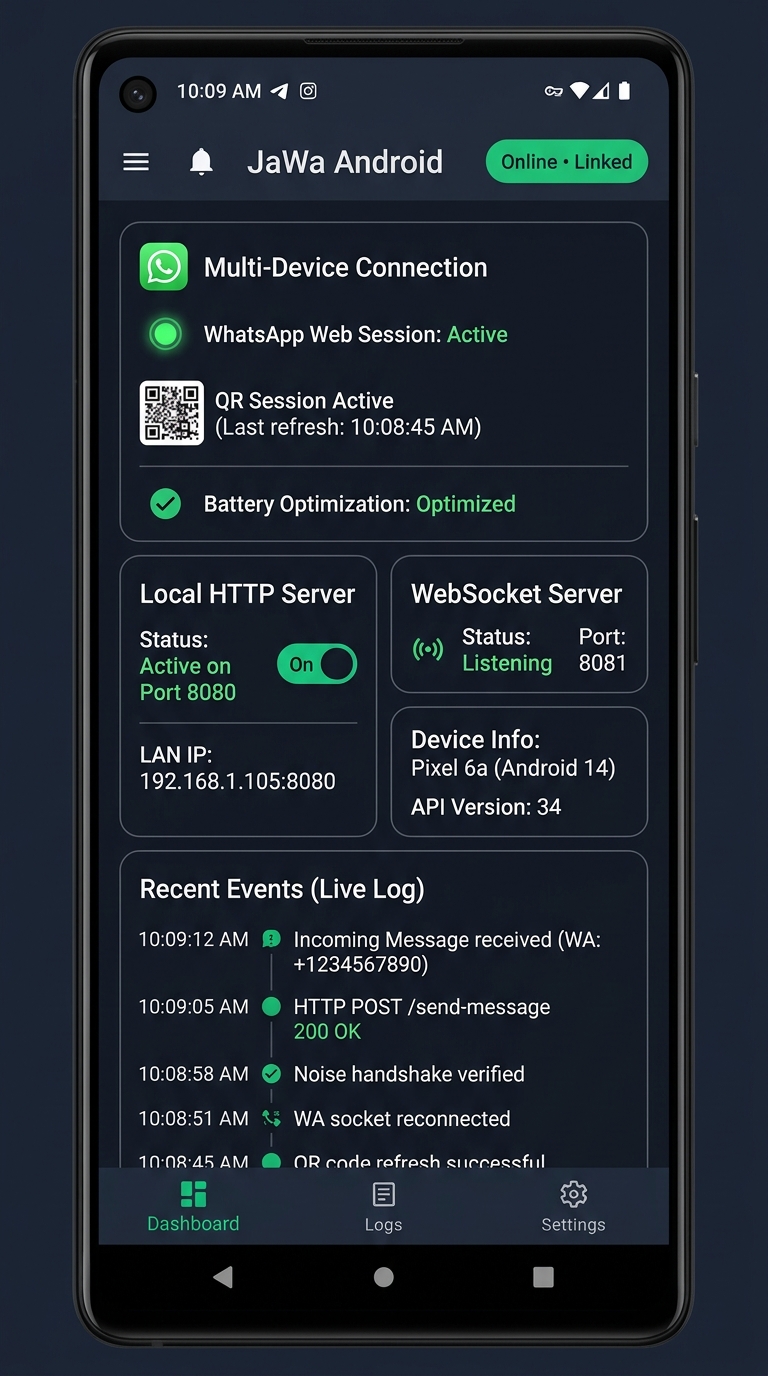
Engineered for Independence.
Hosted on Your Hardware.
Every advertised feature below is verified against the actual JaWa Companion native codebase and
HttpApiServer.kt contract.
Native Android Client
Built with modern Jetpack Compose and Material 3 in an Emerald Green theme. Leverages local Room SQLite databases and SharedPreferences for campaign pauses and connection parameters.
Integrated HTTP REST Server
The Android app hosts its own local HTTP server on port 8080. Send text messages, media, polls, reactions, manage chats and groups directly without external middleware.
Real-Time WebSocket Events
Connect external scripts or dashboards to ws://<phone-ip>:8081. Receive immediate
push events for incoming messages, read receipts, QR state, and disconnect warnings.
Browser Web Dashboard
JaWa Companion serves an embedded web console directly. Open your phone's local IP address from any browser on the same Wi-Fi network to inspect live logs and explore interactive API docs.
Multi-Format Messaging
Supports sending text messages, base64 / multipart media, reply quotes, reactions, polls, locations, interactive CTA buttons, and personalized bulk campaign jobs.
Foreground Service Lifecycle
Maintains active network sockets through Android's native Foreground Service while WhatsApp is linked. Displays a persistent status notification in the Android system drawer.
LAN Network Connectivity
Allows authorized workstations, backend servers, or local scripts on the same Wi-Fi / Local Area Network to communicate with the phone's HTTP API and WebSocket server via Bearer tokens.
Remote Licence Gating
Validates subscriptions against the official cPanel PHP licensing backend. The APK never contains database credentials, utilizing HTTPS prepared statements and unique installation tokens.
Self-Hosted In-App Updates
Built-in update client verifies 64-character SHA-256 hashes, signing certificate lineage, and package invariants before triggering Android's native package installer.
Decoupled Three-Tier Topology.
Zero Unnecessary Intermediaries.
Understand how JaWa Companion communicates with WhatsApp Web Multi-Device servers while serving APIs to your local development environment.
JaWa Companion Core Engine
Android Host • Native KotlinThe heart of the application is the native Android service running the JaWa Java WhatsApp Web engine. It speaks WhatsApp's binary Noise Protocol directly over encrypted WebSockets, while concurrently exposing an internal HTTP REST server (port 8080) and real-time WebSocket server (port 8081).
Install Signed APK
Download the release APK directly to your phone. Grant "Install Unknown Apps" once on Android 8.0+.
Authoritative License Bind
Enter your username on first run. The app verifies validity and atomically registers your hardware UUID via the cPanel backend.
QR Code Multi-Device Linking
Scan the on-screen QR code from WhatsApp (Linked Devices). The app establishes a Noise handshake as a secondary web companion.
API & WebSocket Access
The embedded HTTP server starts automatically. Issue REST calls or connect WebSocket listeners from your PC or local server.
Local REST Endpoints.
Instant WebSocket Event Streams.
Verified against HttpApiServer.kt. Send simple text messages via /send-message
or RESTful messages via /messages/text directly to the Android phone.
Zero Intermediary Cloud
Your API requests travel over your own local network directly to the Android phone. Messages do not pass through any third-party SaaS proxy.
Standard JSON Payloads
Clean request contracts. Send text (/send-message), media attachments
(/send-media), polls, and quotes with standard HTTP POST and
GET.
WebSocket Real-Time Broadcast
Subscribe to ws://127.0.0.1:8081 for live push events:
whatsapp.message_incoming, whatsapp.connection_changed, and delivery
receipts.
Important Network Notice
The Android server binds to the phone's private IP (e.g. 192.168.1.105:8080). Ensure
connecting clients are on the same Wi-Fi subnet or VPN.
# 1. Quick Send Text Message (HttpApiServer /send-message)
curl -X POST "http://192.168.1.105:8080/send-message" \
  -H "Content-Type: application/json" \
  -d '{
    "number": "923224559543",
    "message": "Hello from JaWa Companion API!"
  }'

# 2. Get Authoritative State Snapshot (/status)
curl -sS "http://192.168.1.105:8080/status"

# 3. Check Phone WhatsApp Registration
curl -sS "http://192.168.1.105:8080/isregistereduser?number=923224559543"
// Send text message to Android-hosted JaWa Companion API
const response = await fetch('http://192.168.1.105:8080/send-message', {
method: 'POST',
headers: { 'Content-Type': 'application/json' },
body: JSON.stringify({
number: '923224559543',
message: 'Automated dispatch via JaWa Companion'
})
});
const result = await response.json();
console.log('Success:', result.success, 'MessageID:', result.messageId);import requests
# RESTful text dispatch (/messages/text)
payload = {
"to": "923224559543",
"text": "Your invoice has been generated."
}
response = requests.post(
"http://192.168.1.105:8080/messages/text",
json=payload,
timeout=10
)
data = response.json()
print(f"Message sent: {data.get('messageId')}")// Connect to live WebSocket event stream
const socket = new WebSocket('ws://192.168.1.105:8081?token=YOUR_API_TOKEN');
socket.onmessage = (event) => {
const payload = JSON.parse(event.data);
if (payload.event === 'whatsapp.message_incoming') {
console.log('Incoming Message from:', payload.data.senderPhoneNumber);
console.log('Body:', payload.data.text);
} else if (payload.event === 'whatsapp.connection_changed') {
console.log('Connection state:', payload.data.state);
}
};
Complete On-Device Route Reference.
Verified Against HttpApiServer.kt.
Every route exposed by the Android background HTTP server with method, path, and purpose.
| Method | Path | Category | Description |
|---|---|---|---|
| GET | /health |
Server | Lightweight public health check returning { status: "UP" }. |
| GET | /status |
Server | Full state snapshot: server uptime, ports, LAN status, active WS clients, WhatsApp link state. |
| GET | /whatsapp/connection |
Session | Live WhatsApp connection state, account JID, push name, and platform. |
| GET | /whatsapp/qr |
Session | Fetch companion QR code string for scanning in WhatsApp Linked Devices. |
| POST | /whatsapp/qr/refresh |
Session | Request a fresh QR code from WhatsApp servers if previous code timed out. |
| POST | /send-message |
Messages | Send simple text message: { "number": "...", "message": "..." }. |
| POST | /messages/text |
Messages | RESTful text message endpoint with auto recipient routing:
{ "to": "...", "text": "..." }.
|
| POST | /send-media |
Messages | Send base64 or multipart media (images, PDFs, audio) with optional caption. |
| POST | /messages/reply |
Messages | Quote an earlier message bubble in a chat: { "to", "text", "quotedMsgId" }. |
| POST | /messages/reaction |
Messages | Send single emoji reaction (or empty string to remove reaction). |
| POST | /messages/poll |
Messages | Send an interactive poll with vote options in individual or group chats. |
| POST | /personalized |
Campaigns | Submit a batch campaign of personalized messages with progress tracking. |
| GET | /chats |
Chats | List synced conversations with last message preview, timestamp, and unread counts. |
| GET | /isregistereduser |
Chats | Verify if a phone number has an active registered WhatsApp account (?number=...).
|
| GET | /groups |
Groups | List all WhatsApp groups the companion account is a member of. |
| POST | /groups/create |
Groups | Create a new WhatsApp group with subject title and initial participants. |
| WS | ws://HOST:8081 |
WebSocket | Live bidirectional stream for incoming chats, connection updates, and read receipts. |
Factual Background Execution.
Clear Android OS Expectations.
We provide transparent, engineering-backed facts about Android background services—no false promises of "unrestricted forever execution."
JaWa Companion starts its native Foreground Service only when your WhatsApp session is linked and actively connected. It presents a persistent system notification so Android's Low Memory Killer (LMK) treats the process with priority.
The HTTP and WebSocket servers remain active while the screen is locked, provided the foreground service remains running.
We guide users to disable "Battery Optimization" in Android settings (Doze mode) to prevent OEM aggressive background kills.
If Wi-Fi drops or network switches occur, JaWa's backoff reconnect loop re-establishes the WhatsApp Noise socket automatically.
Note: QR code pairing is the verified production method. Phone pairing-code linking is classified as in development.
Zero Database Exposure.
Rigorous Cryptographic Verification.
How JaWa Companion secures your license, insulates database credentials, and guarantees update authenticity.
No Embedded MySQL Secrets
The APK binary contains zero database usernames, hostnames, or passwords. All license checks hit cPanel REST endpoints running prepared PDO queries over HTTPS.
SHA-256 Binary Integrity
Before any self-hosted APK update can be installed, JaWa computes its 64-character SHA-256 hash. A 1-byte discrepancy causes immediate file destruction.
Developer Certificate Lineage
Android enforces that update APKs share the exact same cryptographic signing key as the installed package. Prevents unauthorized APK spoofing and downgrade attacks.
JaWa Companion Official APK
Changelog & Release Notes
Added campaign pause presets, improved QR pairing reliability, stabilized foreground service lifecycle, and resolved UI reconnection status display.
Common Inquiries & Answers.
Factual, evidence-based responses regarding licensing, background operation, and setup.
HttpApiServer.kt). You can submit standard JSON POST and GET requests from your PC or
server (e.g. http://192.168.1.105:8080/send-message) to execute messaging operations
without any cloud proxy.
https://jawa.innovatorssoft.org/api/v1/license/register over HTTPS to bind the installation
UUID. The cPanel server authoritatively stores device bindings in Database, keeping credentials
completely
off the Android phone.